
Why QuickDrop
Built for people who notice the small delays.
QuickDrop doesn't try to replace macOS.
It removes the friction that macOS leaves behind.
The extra click.
The tiny menu.
The repeated search for the same action.
The interruption that only takes a few seconds — but happens again and again.
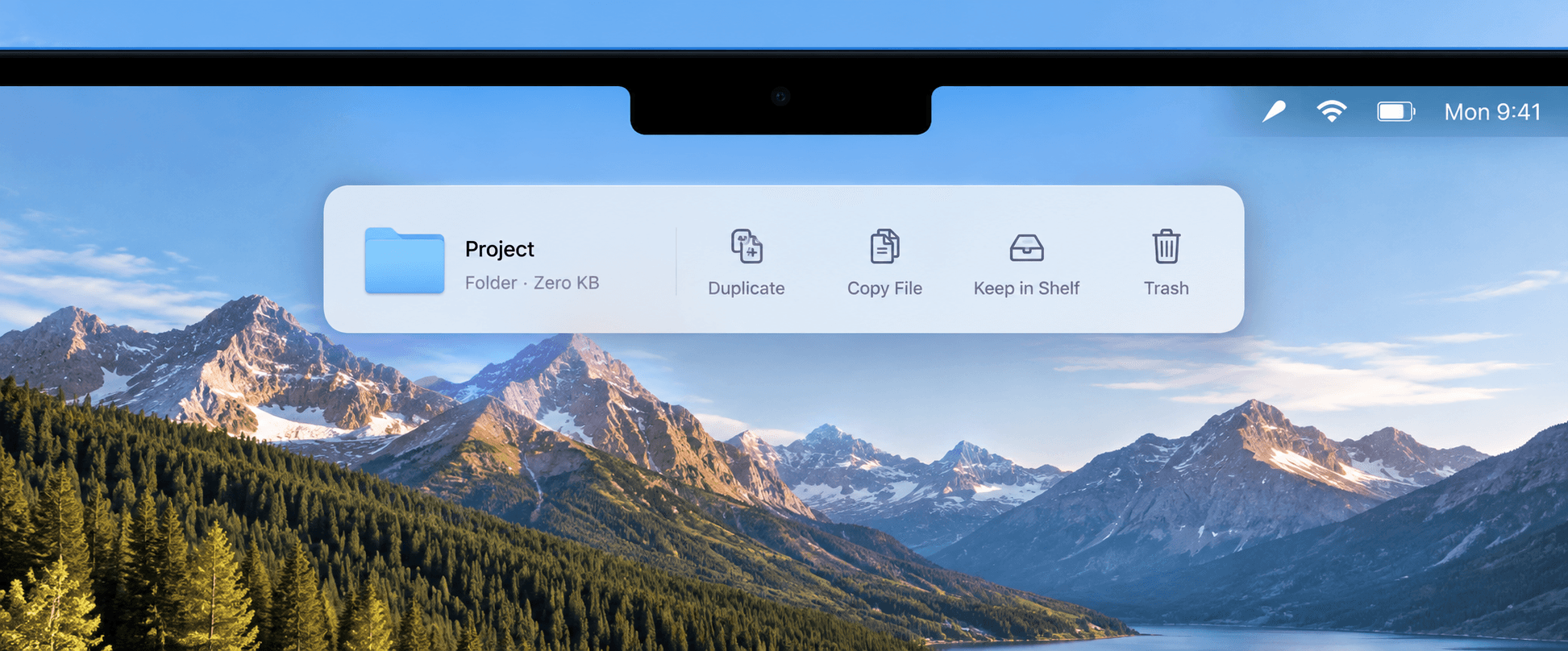
QuickDrop stays out of sight until you drag a file. Then it gives you the actions you need, exactly when you need them.
No learning curve.
No clutter.
No change to the way you already work.
Just a faster, cleaner way to handle files.
Once it becomes part of your workflow, going back feels slow.
One price. No subscription.
QuickDrop
€2.99
One-time purchase
- QuickDrop for macOS
- 1 Mac activation
- No subscription
- Updates for the current major version
Secure checkout by Lemon Squeezy
Frequently asked questions
What is QuickDrop?
QuickDrop is a macOS app that appears under your MacBook notch when you drag a file, so you can quickly run common actions on it without opening another app.
Which Macs are supported?
QuickDrop is built for modern Macs running a current version of macOS.
Is QuickDrop a subscription?
No. QuickDrop is a one-time purchase.
How many Macs can I use it on?
One license activates one Mac.
What happens when I buy a new Mac?
Deactivate the old Mac in QuickDrop Settings before activating the new one. If the old Mac is unavailable, contact support.
Do I need an account?
No. Your license key is your proof of purchase.
Where do I get my license key?
It is included in the purchase receipt sent by Lemon Squeezy.
Can I download QuickDrop again?
Yes, purchased files remain accessible through the Lemon Squeezy order system.